Android
- Android 8.0 or later recommended
- Modern browser: Chrome 90+ or equivalent
- Stable internet connection required for live dealer games
App at Wincleo in the UK: PWA Installation
The full Wincleo experience on any smartphone: slots, live Evolution Gaming tables, sports betting, and your GBP cashier, all via mobile browser or home-screen shortcut.
How to Get Started on Mobile
Wincleo on Mobile
The full Wincleo experience on any smartphone: slots, live Evolution Gaming tables, sports betting, and your GBP cashier, all via mobile browser or home-screen shortcut.
Get Mobile Access 18+ only. Gambling may lead to addiction, so play within your means. Bonus terms apply.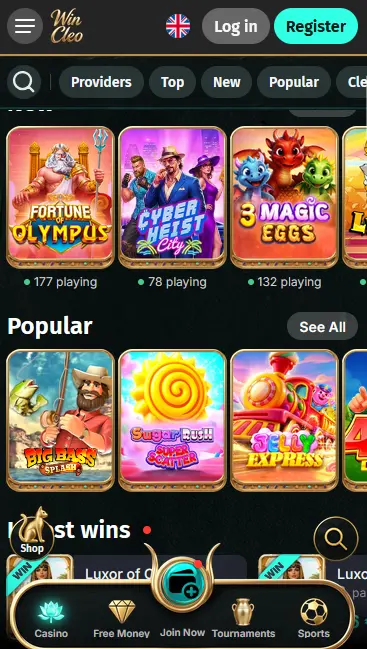
Mobile Account Security
What You Should Do
What You Should Avoid
Mobile Experience: Pros and Cons
Pros
Cons
Device Requirements
Android
iOS
What Makes the Wincleo Mobile Experience Stand Out
No Download Required
The full Wincleo catalogue, including slots from Pragmatic Play and live tables from Evolution Gaming, runs directly in your mobile browser with no app installation needed.
Instant Deposits in GBP
Deposit via Visa, Mastercard, or cryptocurrency from the mobile cashier. GBP is the account currency, so there is no conversion step before you play.
Session Security on Mobile
Every mobile session is protected by 256-bit SSL encryption. Biometric login support depends on your device and browser settings.
The full Wincleo cashier is available in the mobile browser, with no feature reduction compared to the desktop version. You can deposit using Visa and Mastercard debit cards, Paysafecard, Skrill, Neteller, and cryptocurrencies including Bitcoin, Ethereum, Litecoin, and USDT. GBP is the account currency, so pound-denominated deposits require no currency conversion.
| Method | Deposit | Withdrawal |
|---|---|---|
| Visa / Mastercard Debit | Instant | 1-3 business days |
| Skrill / Neteller | Instant | Up to 24 hours |
| Paysafecard | Instant | Not available for withdrawals |
| Bitcoin / Ethereum / Litecoin / USDT | Instant | Up to 24 hours |
| Bank Transfer | 1-3 business days | 3-5 business days |
All cashier transactions on mobile are protected by the same 256-bit SSL encryption that secures the desktop site. Wincleo does not store full card details on its servers; card transactions are processed through a PCI-compliant payment gateway.
Registration is completed entirely within the mobile browser. Navigate to wincleo.io, tap the registration button, and fill in your full name, email address, date of birth, and a secure password. Confirm your email address using the link we send, and your account is active. You must be 18 or over to register.
Tap the Sign In button on the Wincleo homepage, enter your registered email and password, and tap Confirm. If you have added a home-screen shortcut, the site opens directly at the login screen. Forgot-password recovery is accessible from the same screen. For detailed troubleshooting of login issues, see the login page.
All five Wincleo welcome packages are available through the mobile cashier in exactly the same form as on desktop. Deposit via Visa, Mastercard, Paysafecard, or cryptocurrency from your mobile browser, select your preferred welcome package, and the matching bonus funds appear in your bonus wallet immediately. The 470% casino match up to £15,500 plus 470 free spins, the 100% match up to £1,000 plus 100 free spins, the 600% VIP package up to £10,000, the 160% crypto offer, and the 150% sports bonus up to £115 are all claimable on mobile. Players must be 18 or over. Full terms are available on the bonus page.
Every page on wincleo.io, including the mobile version, operates over HTTPS with 256-bit SSL encryption. This applies to account pages, the cashier, and live-game sessions. Your personal data and GBP balance are transmitted in an encrypted channel at all times.
Account security at Wincleo is based on email-and-password login. If you suspect your credentials have been compromised, change your password immediately from the account settings screen and contact support at [email protected].
Biometric login (fingerprint or Face ID) is not natively implemented at the application level, but players who save their login credentials in a biometrically protected password manager on their device can use that manager to fill in the Wincleo login form quickly and securely.
Android 8.0 or later is recommended. Chrome 90 or a comparable modern browser delivers the best performance for slot games and live-dealer tables from Evolution Gaming.
iOS 13.0 or later is recommended. Safari 13 or later provides full support for the mobile site, including WebGL-powered slot games from Pragmatic Play and the live-casino stream from Evolution Gaming.
| Platform | OS Version | Browser | Notes |
|---|---|---|---|
| Android | 8.0 or later | Chrome 90+ | APK shortcut available via site |
| iOS | 13.0 or later | Safari 13+ | Add to Home Screen via Share menu |
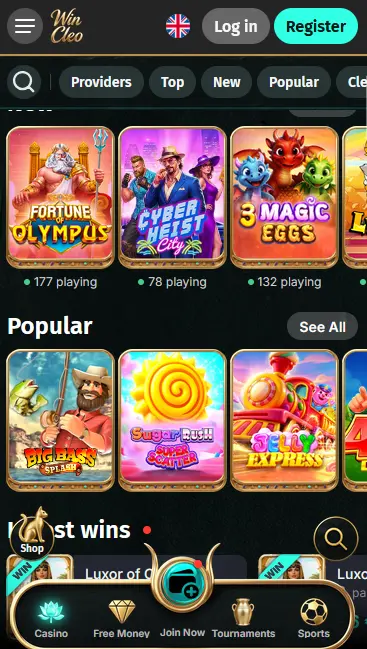
The mobile version of Wincleo gives access to the full game lobby, live-dealer section, sportsbook, bonus wallet, cashier, responsible gaming tools, and support chat. You can filter the slots catalogue by provider, RTP range, or volatility, and launch any title in real-money or demo mode. The live casino streams from Evolution Gaming and Pragmatic Play Live run at the same quality on mobile as on desktop, provided your connection is stable.
The mobile experience is a responsive adaptation of the full site rather than a separate product, meaning the feature set is identical. The layout reflows to portrait orientation by default, with the navigation condensed into a hamburger menu. Some multi-window or multi-tab workflows used on desktop are replaced by single-screen flows on mobile.
The complete slots catalogue is available on mobile, including Gates of Olympus (Pragmatic Play, RTP 96.5%), Sweet Bonanza (Pragmatic Play, RTP 96.47%), Fruit Warp (Thunderkick, RTP 97%), Aviator (Spribe, RTP 97%), and Book of Dead (Play’n GO, RTP 96.21%). High-volatility, bonus-buy, and Megaways slots all load natively in the mobile browser without any plugin.
Lightning Roulette, Crazy Time, Monopoly Live, Deal or No Deal Live (all Evolution Gaming), One Blackjack (Pragmatic Play Live), and Speed Baccarat (Pragmatic Play Live) are available in the mobile live casino. The HD video stream adapts to your connection speed automatically, reducing resolution on slower networks to maintain continuity.
RNG versions of roulette, blackjack, baccarat, and poker from the catalogue are available in the mobile lobby, offering faster rounds than their live-dealer equivalents and suitable for play on shorter sessions.
Progressive jackpot titles including Mega Moolah (Microgaming) and Divine Fortune (NetEnt) are accessible on mobile. Jackpot totals displayed in-game update in real time.
Open Chrome on your Android device and navigate to wincleo.io. Tap the three-dot menu in the top-right corner and select Add to Home Screen or Install App. Tap Add on the confirmation prompt. The Wincleo shortcut appears on your home screen and opens the full mobile site with a single tap. Because Wincleo is not distributed via Google Play, you do not need to enable installation from unknown sources; the shortcut simply opens the browser-based site.
Open Safari on your iPhone or iPad and navigate to wincleo.io. Tap the Share icon (the box with an upward arrow) at the bottom of the screen. Scroll down and tap Add to Home Screen. Edit the name if you wish, then tap Add. The shortcut appears on your home screen and opens the Wincleo mobile site in Safari with full-screen presentation.
Wincleo operates as a progressive web app (PWA) accessible through the home-screen shortcut creation method described above for both platforms. There is no APK file to download and no dependency on the App Store or Google Play. Updates to the site are applied server-side automatically, so your shortcut always opens the current version of Wincleo without any manual update step.
Live chat is available directly within the mobile browser on the Wincleo site and connects to the same support team that handles desktop queries. Email support is available at [email protected] for less urgent matters.
Responsible gaming tools including deposit limits, session time reminders, and self-exclusion are accessible from the account settings page on mobile. If gambling is causing you concern, apply a limit or self-exclusion through the account settings, or contact our support team via live chat or at [email protected] at any time of day.
Mobile App Questions
No native app is currently listed on Google Play or the App Store; you access Wincleo through your mobile browser or via a home-screen shortcut created in Safari or Chrome.
Android 8.0 or later with Chrome 90 or a comparable modern browser is recommended for smooth gameplay on slots from Pragmatic Play and other providers.
Yes, the full bonus wallet and cashier are accessible in the mobile browser, so you can deposit, activate a welcome package, and start playing eligible slots in a single mobile session.
Yes, Lightning Roulette, Crazy Time, Infinite Blackjack, and other Evolution Gaming live tables are optimised for mobile browsers and work well on current iOS and Android handsets.
Play Wincleo on Mobile Today
Grab 470% up to £15,500 and 470 free spins.
Enter the Casino 18+ only. Gambling may lead to addiction, so play within your means. Bonus terms apply.